Reviews
- Average Reviews from [valor]
- Average Reviews up to [valor]
- Number of Reviews from [valor]
- Number of Reviews up to [valor]

Find qualified Google Business Profile leads by industry and region—perfect for Local SEO agencies.
Business name, phone number (when available), website, and full address. Everything you need to make the first contact.
Average rating and total number of reviews. Identify businesses with few reviews or a low average rating—opportunities to offer reputation management.
See whether the profile is verified. Unverified profiles are golden opportunities—the owner hasn’t claimed management yet.
Primary and additional categories. Profiles with only one category may be missing out on visibility for related keywords.
See whether the business has set its hours. Profiles without set hours inspire less confidence in consumers.
Visual indicator (progress bar) that shows the profile’s engagement level. The lower the percentage, the greater the opportunity for improvement—and the greater the sales potential.
Estimated Profile Quality is an indicator unique to Buscar Leads, different from Pre-Analysis. It is used exclusively to rank prospecting opportunities, not for technical diagnosis.
In minutes, you’ll have a qualified list of leads—ready for prospecting, analysis, or export.
Combine Buscar Leads with Pre-Analysis to generate instant diagnostics and turn leads into proposals.
The filter panel lets you segment results precisely. Combine multiple filters to create highly qualified lists.
SABs are service-area businesses without a fixed address visible on Maps—such as plumbers, electricians, and service providers who work at the customer’s home.
Filter by "Unverified Profile" + "No Website" + "Review Count of 10 or More" = businesses with some relevance, but no professional management. Qualified lead.
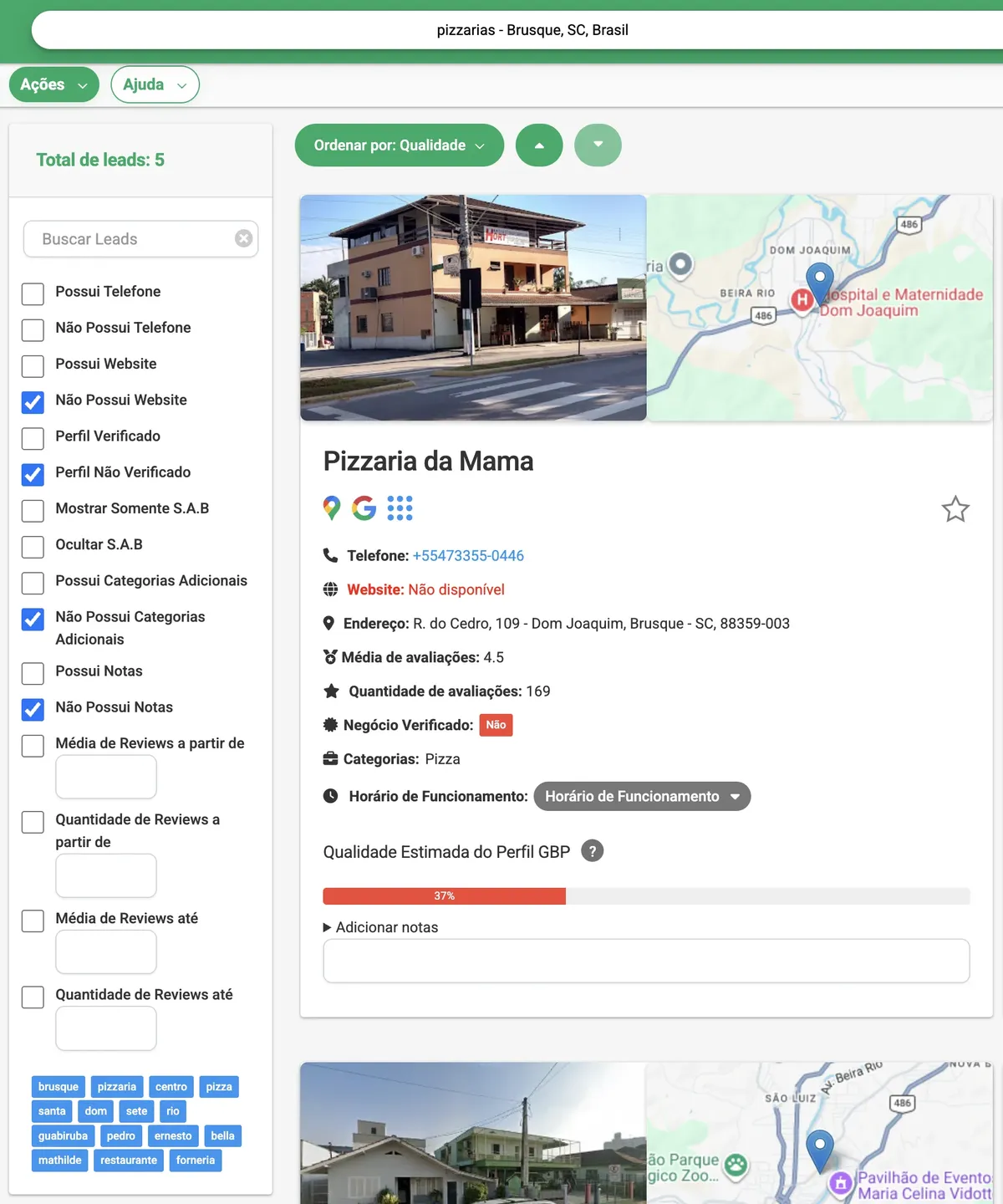
Switch between card view (with map and photo) or table view (tabulated data). Cards are ideal for visual analysis, while tables provide a quick overview.
Sort by: Quality (lowest engagement first), Average Rating, Review Count, or Alphabetical Order.
Mark leads as favorites by clicking the star. Quickly access all your favorites from the top menu. Ideal for setting aside the most promising leads.
Add notes to each lead: contact date, quote amount, next steps, or business observations. Notes are saved and can be searched.
The "Search Leads" field searches all data: business name, address, categories, and the notes you've added.
Export the results to a CSV spreadsheet: Download Filtered Leads (filtered leads only) or Download All Leads (the complete list).
Each search you make is saved automatically. Access your history from the top menu and resume any previous search without having to type it again.
To use Search Leads, you need:
Search Leads works with public data. You don't need Administrator access to the profile or the Chrome extension — just set a keyword and region.
Search Leads was developed for those who need to turn prospecting into an organized process:
If you prospect local businesses and want to show up to meetings with a qualified list, this tool was made for you.
Situation: You want to find businesses that have not yet claimed their Google profile.
Action: Search by category + region and filter by "Unverified Profile".
Result: A list of businesses you can offer the complete service to — claiming + optimization.
Situation: You also offer website creation and want to combine it with Local SEO.
Action: Filter by "No Website" + "Verified Profile".
Result: Businesses that already care about their online presence (they've verified their profile) but still don't have a website.
Situation: You want businesses with some visibility, but without professional management.
Action: Filter by "Review Count: 20 or more" + "Low Estimated Quality".
Result: Businesses with an active customer base but an incomplete profile. High conversion potential.
Situation: You've contacted several leads and need to organize your follow-up.
Action: Add notes to each lead with the contact date and next steps. Use "Search Leads" to find leads with specific notes.
Result: Organized prospecting management without needing an external tool.
No. Search Leads works with public data. You don't need Administrator or Owner access to the profiles you search.
Lead Finder is unlimited on all plans. You can run as many searches as you like, and they’re all saved automatically.
Yes. You can export leads to CSV — all the leads from a search or just those that passed the active filters.
Stop prospecting in the dark. Use Lead Finder to discover local businesses with real opportunities for improvement and start conversations armed with information that demonstrates your expertise.